

We offer a comprehensive 2-month CorelDRAW course designed to equip participants with essential skills in vector graphic design and digital illustration. The course covers everything from vector drawing, logo creation, and typography to color theory, gradients, patterns, and creative illustration techniques. Through hands-on exercises, real-world projects, and creative assignments, participants gain practical experience and proficiency in using CorelDRAW for professional design, branding, and digital media tasks. As Kerala's leading IT training institute, Trinity Technologies is committed to providing high-quality training that meets industry standards and enhances career prospects in the multimedia and design industries.

01
Introduction to CorelDraw
Overview
Understanding Vector and Raster Objects
02
Understanding Workspace
Property Bar
Tool Bars
Docker
Viewing Documents
Zooming, Scrolling, and Print Preview
03
Creating New Document
Modifying Document Properties
Inserting Pages
Analyzing Templates
04
Creating Objects
Modifying Objects Using Property Bar
Creating Free Form Shapes
Drawing and Shaping
05
Using the Freehand Tool
Drawing Lines and Polylines
Drawing Freehand Polygons
Drawing Perfect Shapes
Reshaping Lines and Polylines
Drawing Curves
Reshaping Curves
Drawing Rectangles
Drawing Circles
06
Applying Fills
Fountain Fill
Pattern Fill
Postscript Fill
Understanding Smart Fill
Applying Strokes
07
Converting Objects to Curve
Editing Objects with Shape Tool
Breaking Objects Apart
08
Working with Text
Artistic and Paragraph Text
Formatting Text
Creating Text Along Paths
Inserting Symbol Characters
Tab Settings and Column Settings for Paragraph Text
09
Arranging Objects
Grouping and Ungrouping Objects
Using Guidelines
Aligning Objects
Group and Child Objects
Combining and Breaking Objects
Welding Objects
Aligning and Distributing Objects
10
Working with Interactive Tools
Creating Objects Using Interactive Mesh
Distorting Objects
Transforming Objects Using Free Transform Tool
Creating Multiple Objects Using "Step and Repeat"
Cutting Objects
Modifying Objects Using Shaping Options
11
Importing
Tracing
Masking
Applying Bitmap Effects to Images
12
Preparing Files for Printing
Working with "Print" Dialog
Creating Registration Marks
Creating Crop Marks
Publishing to PDF
Exporting CorelDRAW Files to Other File Formats
13
Work Faster and More Efficiently
Docker
Adobe Plug-in Support
Complex Script Support
Page Numbering
Master Layers
Styles Engine and Docker
Color Styles
Color Harmonies
13
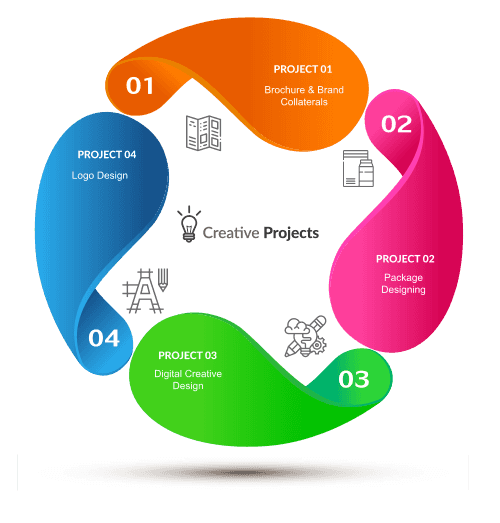
Brochure design
Visiting Card
Vector Drawing
Wallpaper Design
Infographic Design
Trinity Technologies in Trivandrum offers an industry-leading CorelDRAW training and certification program designed to equip individuals with the creative skills and technical expertise needed in today's digital design landscape. This comprehensive course is perfect for beginners and professionals alike, covering everything from basic vector drawing to advanced illustration techniques. With a curriculum aligned to current industry standards, students gain hands-on experience through real-world projects guided by expert instructors. Trinity Technologies ensures learners not only master CorelDRAW but also earn a certification that enhances career prospects in fields like graphic design, branding, and digital media.
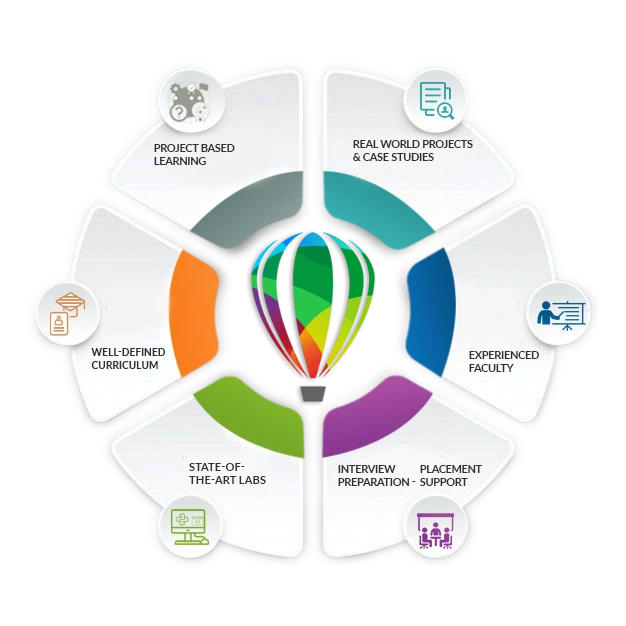
Trinity Technologies is a top choice for CorelDRAW training in Trivandrum due to its commitment to quality education and student success. The institute combines theoretical lessons with practical applications, helping students develop a deep understanding of CorelDRAW tools and techniques. Training is led by experienced professionals who bring valuable industry insights into the classroom, making learning both engaging and relevant.
The faculty at Trinity Technologies consists of seasoned designers with extensive experience in vector graphics and illustration. They provide practical knowledge, mentor students throughout the learning process, and prepare them thoroughly for the CorelDRAW certification exam.
Trinity Technologies offers modern computer labs with high-performance systems and the latest CorelDRAW software, providing an optimal environment for learning and practicing without technical limitations.
The CorelDRAW training program covers essential topics for mastering vector design, including:
Introduction to CorelDRAW: Understanding the interface, tools, and workspace.
Vector Drawing Basics: Creating shapes, paths, and illustrations.
Advanced Design Techniques: Working with layers, gradients, patterns, and blending modes.
Typography and Logo Design: Crafting and manipulating text for branding and projects.
Illustration Techniques: Using brushes, effects, and advanced illustration tools.
Real-World Projects: Logo creation, posters, infographics, and digital artwork.
Exporting and File Management: Best practices for saving and exporting vector graphics for various media.
Students work on live projects simulating industry requirements, from branding and logo design to digital illustrations, ensuring practical skills that meet professional standards.
Trinity Technologies conducts regular assessments, quizzes, project evaluations, and mock exams. Successful completion earns students a recognized CorelDRAW certification, a valuable credential in the design job market.
The institute provides career guidance, portfolio building, interview preparation, and job search strategies. Its placement cell collaborates with leading creative companies to help students secure roles in graphic design, digital media, and branding.
Earning a CorelDRAW certification from Trinity Technologies is more than just a credential; it opens doors to numerous career opportunities. Here's why it matters:
Industry Recognition: CorelDRAW is a leading tool for vector design, and certification from a reputed institute is recognized worldwide.
Career Advancement: Whether starting a design career or progressing professionally, CorelDRAW certification enhances your profile.
Foundation for Advanced Skills: Mastery of CorelDRAW supports learning other design and illustration software, enhancing your overall creative toolkit.
Increased Earning Potential: Certified professionals often secure higher salaries and better job opportunities in design and media.
Global Opportunities: CorelDRAW skills are widely applicable, offering career prospects across industries and countries.
Trinity Technologies in Trivandrum is more than a training center—it’s a gateway to creative excellence. By enrolling in our CorelDRAW training program, you invest in a future of limitless possibilities in digital design and illustration. Whether you're an aspiring designer, experienced professional, or creative enthusiast, Trinity Technologies provides the perfect environment to achieve your career goals.
What is the CorelDRAW course about?
Our CorelDRAW course provides comprehensive training on CorelDRAW, a leading vector graphic and illustration software. The course covers essential tools and techniques for vector design, logo creation, typography, digital illustration, and creative projects, helping you master CorelDRAW for professional design work.
Who should take this course?
This course is ideal for graphic designers, illustrators, digital artists, branding professionals, and anyone interested in vector-based design. It is suitable for both beginners and experienced users looking to enhance their CorelDRAW skills.
What are the prerequisites for this course?
There are no formal prerequisites, but basic computer skills and familiarity with digital design concepts can be helpful. The course begins with foundational vector concepts before moving on to advanced techniques in CorelDRAW.
How is the course delivered?
The course is delivered through a combination of in-person workshops and practical exercises. You will participate in interactive lectures, hands-on labs, and real-world projects to gain practical experience using CorelDRAW tools and techniques effectively.
How long is the CorelDRAW course?
The typical duration is 2 months, with 5 classes per week. For specific scheduling details, please contact our admissions office.
What materials and resources are provided?
Students receive comprehensive course materials, including practice files, tutorial videos, and access to CorelDRAW software. Additional resources may include digital handouts, reference guides, and online support forums.
Will I receive a certification upon completion?
Yes, upon successful completion, you will receive a certificate from our institute demonstrating your proficiency in CorelDRAW.
Are there any exams or assessments in the course?
The course includes quizzes, assignments, and practical projects to evaluate your understanding and skills. These assessments ensure you can effectively apply CorelDRAW in professional design projects.
What career opportunities can benefit from CorelDRAW skills?
CorelDRAW skills are valuable for careers in graphic design, branding, digital marketing, web design, and illustration. Roles such as Graphic Designer, Logo Designer, Digital Illustrator, and Visual Designer often require strong CorelDRAW proficiency.
How do I enroll in the course?
To enroll, visit our office or contact our admissions team. They will provide details on course dates, fees, and registration procedures.
What if I have more questions or need additional information?
If you have further questions or need more information, please contact our admissions office. We are happy to assist you with any inquiries.
What key features and tools of CorelDRAW are covered in the course?
The course covers key CorelDRAW features and tools, including:
Vector Tools: Pen tool, shape tools, and path editing.
Layer Management: Working with layers, groups, and pages.
Typography & Text Effects: Creating and styling text for logos and designs.
Illustration Techniques: Using brushes, gradients, patterns, and effects.
Logo & Branding: Designing professional logos and vector graphics.
Advanced Techniques: PowerClips, blending modes, and vector compositing.
How can CorelDRAW help in graphic design and digital illustration?
CorelDRAW provides powerful vector tools for creating logos, illustrations, branding materials, and other graphics. The course teaches you to leverage these tools to produce professional designs and digital artwork suitable for print, web, and multimedia projects.
Can I use CorelDRAW for web design and digital media?
Yes, CorelDRAW is widely used for web graphics, app icons, UI elements, and digital media illustrations. The course includes topics on creating vector assets for web and multimedia applications.
Trinity Technologies
Radheyam Tower
Gandhari Amman Kovil Road
Opp. Rajakumari Jewelry, Pulimood
Trivandrum, Kerala, 695001
Phone Numbers:
Email:
Monday - Saturday: 7:00 AM - 8:00 PM
Sunday: Closed
Batch Timings Available:
Morning | Afternoon | Evening